
MikroTik RouterOS & Network Infrastructure
Khairul Abdi Dongoran
Full-Stack Developer · Backend Engineer · Golang Developer · Linux Server & Network Infrastructure
I design, configure, secure, audit, and maintain network infrastructure
based on MikroTik RouterOS, integrated with Linux Server, Docker,
Tailscale, Cloudflare Tunnel, Hotspot/Voucher, firewall, NAT, routing,
monitoring, and production services.
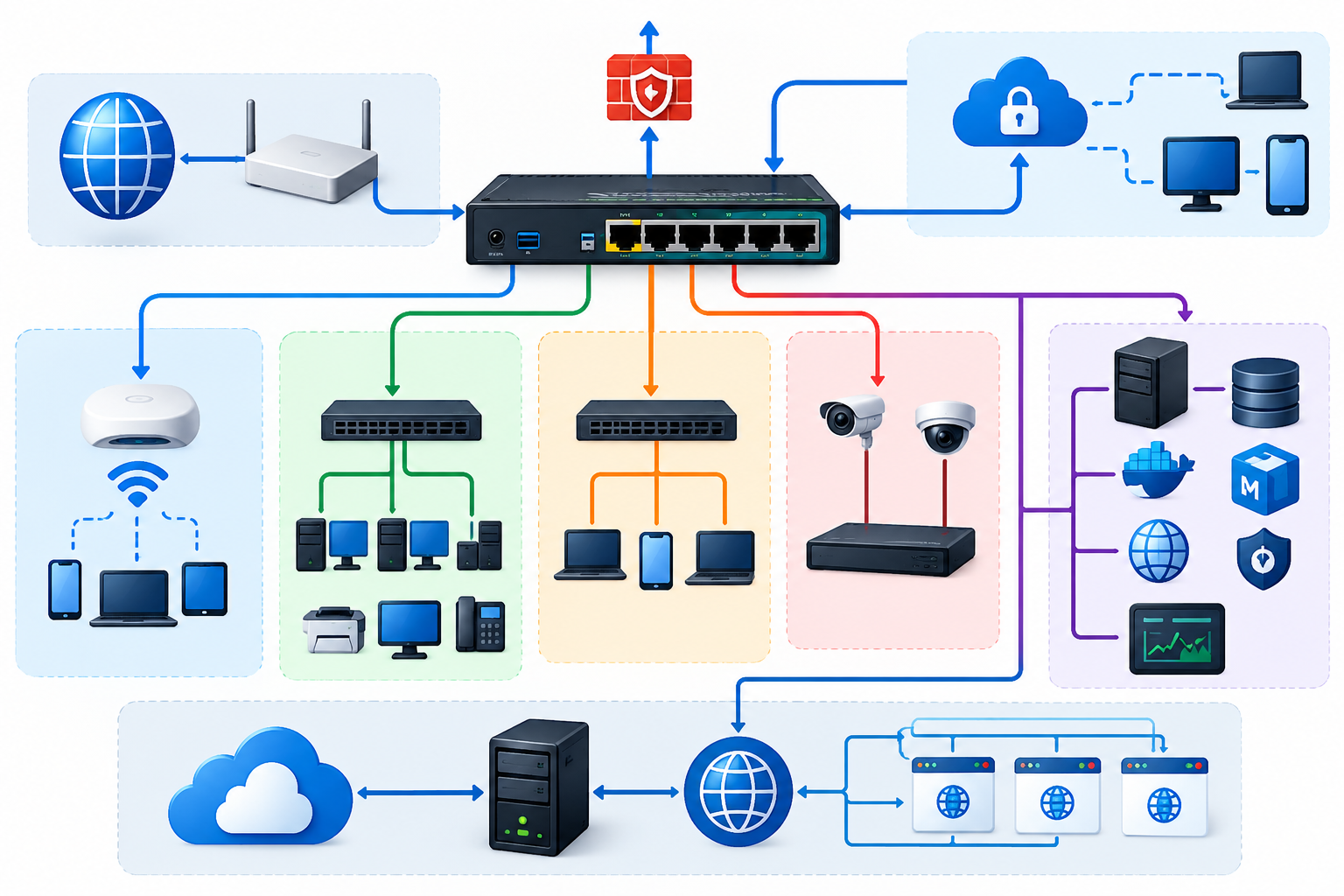
This article explains how I build and maintain a MikroTik-based network that works with Linux servers, Docker applications, private access, and public web services. The goal is simple: keep the network stable, keep access controlled, and make production changes with lower risk.
About This Competency
My MikroTik experience is not limited to basic router configuration. I use MikroTik as part of a real architecture that connects:
- ISP / ONT connectivity;
- internal networks;
- Hotspot/Voucher networks;
- Ubuntu Server for production applications;
- Docker and PostgreSQL;
- remote administration through Tailscale;
- application publication through Cloudflare Tunnel;
- firewall and network isolation;
- monitoring, logging, backup, and troubleshooting.
My main focus is availability, security, maintainability, and troubleshooting without disrupting production.
Current Network Architecture
flowchart LR
    INTERNET((Internet))
    ZTE["ZTE / ONT<br/>192.168.1.1"]
    MT["MikroTik hEX RB750Gr3<br/>RouterOS<br/>WAN: 192.168.1.2"]

    subgraph BRIDGE["Bridge Hotspot"]
        LOCAL["Internal LAN<br/>10.10.10.0/24<br/>Gateway: 10.10.10.1"]
        HOTSPOT["Voucher / Hotspot<br/>21.21.21.0/24<br/>Gateway: 21.21.21.1"]
    end

    NEBULA["Ubuntu Server Nebula<br/>10.10.10.100<br/>Docker + PostgreSQL + Nginx"]
    ORION["Orion Workstation<br/>21.21.21.67 / .59"]
    KALI["Kali Linux<br/>21.21.21.54 / .254"]
    CLIENTS["Voucher Clients<br/>DHCP: 21.21.21.50-254"]
    TS["Tailscale Private Network"]
    CF["Cloudflare Tunnel"]
    WEB["Public Web Applications"]

    INTERNET --> ZTE --> MT
    MT --> LOCAL
    MT --> HOTSPOT
    LOCAL --> NEBULA
    HOTSPOT --> ORION
    HOTSPOT --> KALI
    HOTSPOT --> CLIENTS

    ORION -. secure admin .-> MT
    KALI -. secure admin .-> MT
    TS -. private remote access .-> NEBULA
    NEBULA --> CF --> INTERNET --> WEB
Design principles
The network has two main address ranges inside the MikroTik infrastructure:
| Network | Gateway | Purpose |
|---|---|---|
192.168.1.0/24 | 192.168.1.1 | WAN between ONT/ZTE and MikroTik |
10.10.10.0/24 | 10.10.10.1 | Internal LAN / server |
21.21.21.0/24 | 21.21.21.1 | Hotspot, voucher, and selected workstations |
The MikroTik WAN receives 192.168.1.2/24 and uses 192.168.1.1 as the upstream gateway.
The Nebula server is on 10.10.10.100, while the voucher network uses 21.21.21.0/24.
The addresses above are private/internal network addresses used to
explain the design. Credentials, private keys, secrets, and tokens are
not published.
Network Segmentation & Isolation
One important control is preventing voucher clients from accessing the server/internal network.
Voucher / Guest
21.21.21.0/24
       |
       | Internet access: ALLOWED
       |
       +---------------------------> Internet
       |
       X  Internal access: BLOCKED
       |
10.10.10.0/24
Internal / Server
The firewall applies this concept:
src-address = 21.21.21.0/24
dst-address = 10.10.10.0/24
action      = drop
This allows Hotspot users to keep using the Internet without freely accessing the internal server network.
Hotspot & Voucher Architecture
MikroTik runs Hotspot on this network:
Network : 21.21.21.0/24
Gateway : 21.21.21.1
DHCP    : 21.21.21.50 - 21.21.21.254
The flow:
sequenceDiagram
    participant U as User
    participant AP as Access Point
    participant MT as MikroTik
    participant HS as Hotspot
    participant NET as Internet

    U->>AP: Connect Wi-Fi
    AP->>MT: Forward client traffic
    MT->>U: DHCP IP assignment
    U->>HS: Open web / captive portal
    HS->>U: Login page
    U->>HS: Voucher credentials
    HS->>HS: Validate user/profile
    HS-->>U: Authentication success
    U->>NET: Internet access
Voucher management
I understand and manage these concepts:
- Hotspot user;
- user profile;
- session;
- active user;
- cookie / MAC cookie;
- HTTP CHAP/PAP;
- time-based voucher;
- scheduler;
- bandwidth/profile control;
- Mikhmon integration;
- custom captive portal;
- expiry automation;
- user/session cleanup;
- logging and troubleshooting.
Example profiles used in the implementation include duration-based packages such as:
Paket-5Jam
Paket-2Hari/24Jam
Paket-4Hari/24Jam
Paket-7Hari/24Jam
Paket-30H/24Jam
Secure Administration
Router management is not opened freely to every client.
Administrative access is focused on trusted devices such as the Orion workstation and Kali Linux.
SSH
Security configuration applied:
- password authentication is disabled;
- authentication uses an ED25519 SSH public key;
- SSH forwarding is disabled;
- strong crypto is enabled;
- SSH access is limited to trusted management IPs.
WinBox
WinBox remains available for GUI administration, but the connection source is limited to authorized management addresses.
Layer-2 management
To reduce the attack surface:
- MAC Server is limited/disabled;
- MAC WinBox is limited/disabled;
- MAC Ping is disabled;
- Neighbor Discovery is not exposed freely;
- RoMON is disabled when it is not required.
Firewall Strategy
I audit and harden the input chain, forward chain, NAT, connection tracking, and service exposure.
Main concept:
flowchart TD
    PKT["Incoming Packet"] --> EST{"Established / Related?"}
    EST -->|Yes| ACCEPT["Accept"]
    EST -->|No| INVALID{"Invalid?"}
    INVALID -->|Yes| DROP["Drop"]
    INVALID -->|No| ADMIN{"Trusted Admin?"}
    ADMIN -->|Yes| MGMT["Allow Required Management"]
    ADMIN -->|No| ICMP{"Allowed ICMP / Required Service?"}
    ICMP -->|Yes| ACCEPT
    ICMP -->|No| WAN{"From WAN?"}
    WAN -->|Yes| DROP
    WAN -->|No| POLICY["Evaluate Network Policy"]
Areas I audit:
inputvsforward;- established/related connections;
- invalid connections;
- ICMP;
- DHCP;
- WAN exposure;
- source address lists;
- network isolation;
- NAT masquerade;
- stale/legacy firewall rules;
- connection tracking;
- service ports/helpers;
- SYN state and abnormal connections.
NAT & Internet Access
MikroTik performs source NAT/masquerade so internal and Hotspot networks can access the Internet.
Concept:
Client 21.21.21.x
       |
       v
MikroTik
srcnat / masquerade
       |
       v
WAN 192.168.1.2
       |
       v
ONT 192.168.1.1
       |
       v
Internet
I also audit legacy dstnat/port-forwarding rules and remove old rules that are no longer used after validation, so production services are not interrupted.
Linux Server Integration
MikroTik does not stand alone. The infrastructure is integrated with Ubuntu Server Nebula.
flowchart LR
    USER["Internet User"]
    CF["Cloudflare Edge"]
    TUN["Cloudflare Tunnel"]
    NGINX["Nginx"]
    APP["Docker Applications"]
    DB["PostgreSQL"]
    TS["Tailscale"]
    ADMIN["Trusted Admin"]

    USER --> CF --> TUN --> NGINX --> APP
    APP --> DB
    ADMIN --> TS --> DB
Nebula uses:
LAN IP     : 10.10.10.100
OS         : Ubuntu Server 24.04
Containers : Docker / Docker Compose
Proxy      : Nginx
Database   : PostgreSQL
Remote     : Tailscale
Public Web : Cloudflare Tunnel
Firewall   : UFW
Public websites do not require direct inbound port forwarding from the Internet to the server because public access can use an outbound Cloudflare Tunnel.
This reduces exposure for the home/server network.
Tailscale & Private Remote Access
Remote administration uses a private overlay network.
Use cases:
- SSH server;
- remote database access;
- server administration;
- private service exposure;
- troubleshooting;
- management from another workstation.
PostgreSQL can remain bound to localhost/internal interfaces and be forwarded in a limited way through Tailscale for trusted devices.
Traffic Management
I also understand MikroTik usage for:
- Simple Queue;
- Queue Tree;
- packet/connection marking;
- Mangle;
- traffic classification;
- per-user/profile bandwidth;
- HTTP/HTTPS traffic classification;
- ICMP handling;
- traffic monitoring;
- connection inspection.
In a production environment, changes to queue/mangle are made conservatively because they can directly affect connection quality for all users.
DHCP, ARP & Address Management
Areas I manage/audit:
IPv4
Subnet / CIDR
ARP
DHCP Server
DHCP Lease
Static Lease
IP Pool
Gateway
DNS
Routing Table
Connection Tracking
I use static DHCP leases for important devices so their addresses remain consistent and easier to monitor.
Routing
The current main routing is simple and maintainable:
0.0.0.0/0
   |
   +--> 192.168.1.1 (upstream gateway)

10.10.10.0/24
   +--> directly connected

21.21.21.0/24
   +--> directly connected

192.168.1.0/24
   +--> directly connected WAN
I also audit:
- old static routes;
- routing table;
- routing rules;
- gateway;
- source routing;
- ICMP redirects;
- route consistency.
Logging & Storage
I understand the impact of logging on MikroTik devices with limited internal flash.
Audit areas include:
- memory logging;
- disk logging;
- Hotspot debug logging;
- log rotation;
- RouterOS internal storage;
- export configuration;
- binary backup;
- external USB storage;
- remote syslog.
A long-term strategy can use USB or remote logging to reduce repeated writes to internal flash.
Backup & Recovery
Before significant changes, I create backups first.
Example:
MikroTik
   |
   +-- Binary Backup
   |
   +-- RouterOS Export (.rsc)
   |
   +-- Hotspot Portal Files
   |
   +--> Secure copy to Linux workstation/server
Backups can be stored on:
- workstation;
- server;
- USB storage;
- secure documentation repository.
Secrets/private keys are not stored in public repositories.
Production Change Strategy
I avoid the approach of "change many configurations and see whether something breaks".
My workflow:
flowchart LR
    A["Audit"] --> B["Identify Risk"]
    B --> C["Backup"]
    C --> D["One Safe Change"]
    D --> E["Verify Connectivity"]
    E --> F{"Healthy?"}
    F -->|Yes| G["Document"]
    F -->|No| H["Rollback"]
    H --> B
Validation after changes can include:
- ping gateway;
- ping Internet;
- DNS resolution;
- voucher login;
- Hotspot session;
- server connectivity;
- SSH/WinBox access;
- public website availability;
- Docker/application health.
Troubleshooting Approach
I use a layer-by-layer approach:
Physical Link
    ↓
Ethernet / Bridge
    ↓
ARP
    ↓
IPv4 / Subnet
    ↓
Routing
    ↓
NAT
    ↓
Firewall
    ↓
TCP / UDP
    ↓
DNS
    ↓
Application
Tools commonly used:
MikroTik Terminal
WinBox
ping
traceroute
Torch
Packet Sniffer
Connection Tracking
ARP Table
Routing Table
Firewall Counters
Linux ip / ss / ping / traceroute
tcpdump / Wireshark
nmap (authorized environments)
Tailscale diagnostics
Docker / systemd logs
Core MikroTik & Networking Skills
MikroTik RouterOS
- RouterOS configuration & troubleshooting
- MikroTik hEX / RB750Gr3
- Bridge configuration
- IPv4 addressing
- Subnetting & CIDR
- ARP
- DHCP Server & DHCP Lease
- IP Pool
- DNS
- Static & default routing
- NAT / Masquerade
- Firewall Input / Forward
- Address List
- Connection Tracking
- Mangle
- Queue / Traffic Control
- Hotspot
- Voucher Management
- Mikhmon integration
- Scheduler & RouterOS scripts
- SSH / WinBox hardening
- Logging
- Backup & restore
- USB/external storage planning
Networking & Security
- TCP/IP
- TCP vs UDP
- ICMP
- Ports & services
- Network segmentation
- Firewall / ACL
- Least-privilege administration
- SSH public-key authentication
- ED25519
- Layer-2 management hardening
- Secure remote access
- Tailscale / WireGuard concepts
- Cloudflare Tunnel
- UFW
- Linux networking
- Network reconnaissance and troubleshooting in authorized environments
What I Can Help Build
I am open to project collaboration and work opportunities that need a combination of Software Engineering + Server + Networking.
I can help with:
- MikroTik setup for homes, offices, businesses, or hotspots;
- internal network and guest network design;
- MikroTik Hotspot/Voucher;
- firewall hardening;
- network segmentation;
- DHCP/DNS/NAT/routing;
- bandwidth management;
- secure remote administration;
- Linux server integration;
- Docker infrastructure;
- Cloudflare Tunnel;
- Tailscale/private networking;
- server and network troubleshooting;
- network audit;
- backup & recovery planning;
- topology and SOP documentation.
Project Collaboration Workflow
1. REQUIREMENT
   Understand business needs, user count, ISP, server, applications, and security.

2. NETWORK DESIGN
   Create topology, IP plan, segmentation, access policy, and capacity plan.

3. SECURITY DESIGN
   Define firewall, management access, isolation, VPN, logging, and backup.

4. IMPLEMENTATION
   Configure MikroTik, Linux Server, access points, VPN, and related services.

5. TESTING
   Connectivity, DNS, routing, firewall, voucher, bandwidth, fail/recovery test.

6. DOCUMENTATION
   Diagrams, IP plan, configuration notes, SOP, backup, and recovery procedure.

7. MAINTENANCE
   Monitoring, troubleshooting, updates, backup, and capacity review.
Why This Combination Matters
As a Backend / Full-Stack Engineer, I do not only see applications from the source-code side.
I can trace a request through:
Client
 ↓
Wi-Fi / Ethernet
 ↓
MikroTik
 ↓
Routing / NAT / Firewall
 ↓
Linux Server
 ↓
Nginx / Cloudflare Tunnel
 ↓
Docker
 ↓
Backend API
 ↓
PostgreSQL
This helps during troubleshooting because production problems do not always come from application code. The issue can be in DNS, routing, firewall, NAT, Linux, containers, reverse proxy, database, or the application itself.
Security Philosophy
Expose only what is required. Trust only what is explicitly authorized. Keep recovery possible before changing production.
Principles I use:
- least privilege;
- deny unnecessary inbound access;
- isolate untrusted clients;
- prefer key-based authentication;
- minimize exposed management services;
- separate public and private access paths;
- backup before major changes;
- monitor before optimizing;
- make incremental production changes;
- document infrastructure.
Contact
Khairul Abdi Dongoran
Full-Stack Developer · Backend Engineer · Golang Developer · Linux Server · MikroTik RouterOS · Network Infrastructure
- GitHub:
github.com/khairul-abdi - LinkedIn:
linkedin.com/in/khairul-abdi-dongoran - Website:
khairul-abdi-dongoran.com
Open for software engineering roles, backend/full-stack opportunities,
infrastructure collaboration, MikroTik/network projects, and technical
consulting.